
A Minimal, Evolving AI Brain for Real Software Development

Software development has never been just “writing code.” It’s a constant negotiation between requirements, architecture, tests, documentation, and the long shadow of past decisions. What slows teams down is not a lack of skill — it’s the constant rebuilding of context. Senior developers excel not because they are smarter, but because they remember.
AI can reach that level — but only if we give it continuity.
Modern language models recognize patterns extremely well, yet they forget everything between conversations. Without a memory layer, even the most advanced AI behaves like an intern starting from zero every day.
This is why many teams turn toward heavy solutions like vector databases, embedding pipelines, or multi-agent orchestration. These are useful when your data is chaotic and comes from emails, PDFs, documents, and logs.
But software development is nothing like that.
Our domain is beautifully simple:
- code
- documentation
- architecture
- tests
- decisions
- domain rules
- schemas
Everything is text. Everything is structured. Everything fits together.
Because of this, the best solution isn’t a giant retrieval system —
it’s a clean memory folder + a disciplined prompting method.
The Memory File System: A Practical AI Brain
Instead of using a database or embedding store, you give the AI a simple folder — a mind — filled with Markdown files:
/.mind/
    index.md
    architecture-review.md
    technical-patterns.md
    business-overview.md
    domains/
    fix-plans/
    changelog.md
It’s small, readable, and version-controlled.
The AI:
- Reads the memory before working
- Executes the task
- Updates the memory with new insights
This becomes a self-reinforcing loop:
Read → Work → Update → Improve
Over time, the AI begins acting like a team member who understands your architecture, remembers your decisions, and follows your conventions without needing reminders.
Let the AI Build Its Mind From Everything
For the AI to behave like a senior engineer, it must process all the information a senior engineer would know:
- the full codebase
- documentation
- diagrams & schemas
- unit tests
- API specifications
- commit history
- PM tickets
- logs
- product goals
- workflows
- naming conventions
This is the AI’s real onboarding process.
And because the system is file-based, the AI can evolve its mind over time. When you fix something through the AI, it updates the relevant memory documents. When business rules change, they get reflected in /domains. When architecture evolves, /architecture-review.md evolves with it.
Your project knowledge becomes alive — and shared.
Specification Prompting: Teaching the AI How to Think
The mind is the memory.
Specification prompting is the discipline.
It defines how the AI uses its knowledge:
- read relevant files
- follow documented patterns
- apply architectural rules
- respect domain constraints
- capture new learnings
- update the changelog
- maintain consistency
You no longer ask the AI to “figure everything out.”
You tell it how to think — and it follows reliably.
With a closed-loop rule like:
“After completing a task, update the mind with new insights.”
…you convert the AI from a stateless assistant into a continuously improving collaborator.
Browser Chat AIs Cannot Do This
Browser AIs are disposable conversations. They cannot:
- read your codebase
- create folders
- update memory
- maintain continuity
- connect to PM tools
- self-improve over time
They are toys, not teammates.
To build an AI engineer, you need:
- Cursor
- or Windsurf
- or a CLI agent
- or any environment where the AI has read/write access
This is where everything changes.
How to Do This in Cursor: Building the Mind Through MCP Integrations
Cursor supports MCP clients (Model Context Protocol) — allowing AI to connect directly to external sources.
You can connect Cursor to:
- GitHub → codebase, pull requests, issues
- Jira → tasks, requirements, workflows
- Slack → team discussions, decisions
- Confluence / Notion → documentation
- Linear → product planning
- Your database → schema & migrations
- Internal APIs → system behavior
- Monitoring tools → logs, errors
This means the AI can pull business, technical, architectural, and operational context directly from the source — not just the local repository.
The Agent Workflow in Cursor
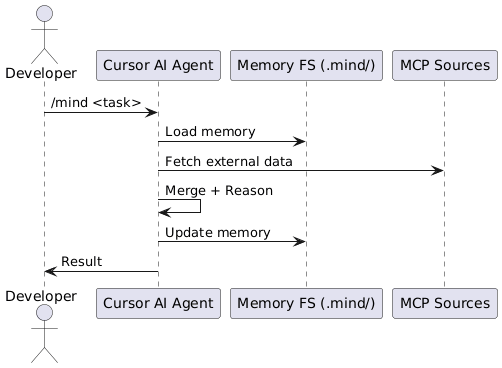
- AI agent reads memory from.mind/
- MCP client pulls new data from GitHub/Jira/etc.
- Agent synthesizes insights
- Agent updates .mind/
- Agent logs changes in CHANGELOG.md
- Agent repeats this as a scheduled task
This builds a multi-perspective mind:
- Business perspective → from Jira, Slack, Confluence
- Technical perspective → from code, PRs, tests
- Architecture perspective → from docs and schemas
- Operational perspective → from logs and monitoring
And all of it merges back into plain Markdown knowledge.
Periodic Mind Building
Cursor allows you to run tasks periodically (via CLI, cron, or background agents).
You can create a job:
- every morning
- every hour
- every commit to main branch
Where the AI:
- fetches new tickets
- reads new PRs
- checks new log patterns
- updates mind files
- cleans redundant information
- summarizes decisions
- maintains architectural consistency
You essentially have a living documentation AI that never forgets.
The /mind Command — Shortcut for Everything
Inside Cursor, you create a custom command:
/mind <your prompt>
This triggers:
- memory reading
- domain/context loading
- specification prompting
- output + memory update
Examples:
/mind explain the new authentication flow
/mind fix this and update the architecture review
/mind analyze the last 20 commits and update business-overview
/mind extract domain rules from jira tickets
/mind refactor technical-patterns.md with new examples
Within weeks, the AI becomes extremely familiar with the project.
Within months, it becomes the most knowledgeable engineer on the team.
Not because it’s smarter — but because it never forgets.
Agent Workflow with MCP Sources
Drawbacks (Not a Big Deal, But Good to Know)
- Memory files require occasional cleanup
- Old content must be pruned or archived
- AI may sometimes over-document
- Large .mind/ folders slow down reading
- You must review updates occasionally
- MCP integrations require setup
- The process works best with a dedicated AI editor
These drawbacks are minor compared to the overhead of building huge retrieval systems — and everything is visible, editable, and version-controlled.
Final Thoughts
This approach is powerful because it stays simple:
a disciplined AI + a structured memory folder + connections to real work sources.
Let the AI process everything in your workflow.
Let it build its mind from all perspectives — business, technical, architectural.
Let it evolve that mind with every task.
Let /mind become the doorway to your AI teammate.
Give it time, and you won’t just have an assistant.
You’ll have a senior engineer who never forgets, never gets tired, and understands your project better than anyone else.
A memory file system works for software development because the domain is already structured and textual. Code, architecture decisions, tests, schemas, and business rules all follow predictable patterns. Markdown acts as a lightweight, human-readable semantic layer that preserves meaning without needing embeddings.
Where vector databases excel at retrieving unstructured or mixed-media content, software projects already provide rich structure — so plain text storage is both sufficient and efficient.
Each .mind/*.md file is a cognitive unit:
- index.md → table of contents for the AI’s mind
- architecture-review.md → long-term structural understanding
- technical-patterns.md → procedural memory (how things are done)
- business-overview.md → domain memory and rules
- domains/ → separate “sub-minds” for each business area
- fix-plans/ → episodic memory: problems encountered and how they were solved
- changelog.md → temporal memory: how the project evolves over time
This mirrors human cognition: structural memory, procedural patterns, domain semantics, past experience, and chronological history.
Cursor supports MCP (Model Context Protocol) to fetch external context.
Setup flow:
- Open Cursor settings → Integrations
- Add a new MCP client (GitHub, Jira, Slack, Notion, etc.)
- Provide authentication keys or OAuth tokens
- Cursor automatically generates commands for each service
- AI can now query these sources during /mind operations
Once connected, Cursor can pull:
- issues from GitHub
- product requirements from Jira
- team discussions from Slack
- architecture documentation from Confluence
- database schemas from your DB connection
This turns your AI into a multi-source context engine.
Task: “Fix a bug where billing totals are miscalculated.”
AI workflow:
- Reads .mind/domains/financial-management.md
- Reads .mind/technical-patterns.md for calculation rules
- Reads recent PRs via MCP GitHub
- Reads related tickets via MCP Jira
- Locates the code and applies the documented pattern
- Writes a new fix plan: /mind/fix-plans/ticket-7890-fix-plan.md
- Updates financial-management.md with a new business rule
- Writes to CHANGELOG.md
This is exactly how a senior engineer would approach the problem.
Evolution happens organically with each AI task:
- new rules → added to domain files
- new patterns → written to technical-patterns.md
- architectural changes → reflected in architecture-review.md
- fixes → stored in fix-plans
- decisions → logged into changelog.md
- outdated knowledge → moved to /archive
The mind slowly becomes more accurate, more complete, and more aligned with the project’s reality.
A Markdown memory works for software development, but vector search is valuable when your AI must handle:
- thousands of pages of mixed-format documents
- legal/financial PDF archives
- customer conversations
- product analytics
- huge multi-team repositories
In these cases, vector search complements the .mind/ system but doesn’t replace it.

 RoofMan Official Blog
Pingback: The AI That Dreams in Markdown | RoofMan Official Blog
Pingback: How Scripts Enhance AI Consistency and Performance | RoofMan Official Blog