
The AI That Dreams in Markdown

In the previous article,
I explained how a simple folder — a structured .mind directory — can turn an AI assistant into something more stable, more consistent, and far more useful than a standard chat model.
But there is a missing ingredient that makes the AI mind truly powerful.
Not just memory…
but sleep.
Just like humans don’t grow while awake — they grow while resting —
an AI software development agent becomes significantly more capable when it has a structured cycle to organize, compress, and re-link all the knowledge it has learned.
This single idea dramatically enhances the agent’s intelligence and helps build software systems much faster.
🌙 The Sleep Phase: What Humans and AI Have in Common
Humans learn during the day, but understand during the night.
During sleep, your brain:
- consolidates new memories
- merges information from different experiences
- removes noise
- strengthens important concepts
- fixes inconsistencies
- reorganizes internal mental structures
This is how a junior developer slowly becomes senior.
Not from writing code — but from digesting everything they interacted with.
So if our AI has a “mind,” why shouldn’t it have a “sleep cycle” too?
⚙️ Artificial Sleep for AI Agents: The organize-mind Cycle
A software-development-focused AI agent has a predictable workflow:
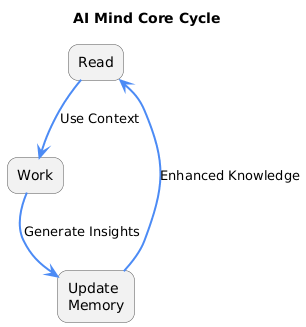
Read → Work → Update memory
This is good, but incomplete.
What’s missing is periodic consolidation — a process where the AI stops producing output and instead:
- reviews its entire .mind/ folder
- reorganizes knowledge
- merges duplicates
- fixes broken references
- rebuilds navigation
- compresses long files
- archives outdated rules
- strengthens patterns and architecture
- normalizes domain language
- links business rules to technical decisions
- removes drift and contradiction
Think of this as the AI’s internal defragmentation + deep sleep + mental reboot.
When the organize-mind cycle runs, the agent becomes more:
- coherent
- consistent
- faster
- accurate
- context-aware
- architecture-aligned
- business-aligned
- and easier to trust
This dramatically accelerates software development because the AI no longer has to rediscover context — it refines and strengthens it.
🚀 Why Sleep Makes the Agent Build Systems Faster
A traditional LLM forgets everything between tasks.
Even with embeddings, the context is noisy and often mismatched.
But a mind-driven agent that remembers AND reorganizes its memory gains several advantages:
1. Faster architectural decisions
Because architecture-review.md and technical-patterns.md grow cleaner and more interconnected.
2. More accurate domain logic
Because domain rules stop drifting.
They reflect the real, updated state of the system.
3. Faster feature development
The agent doesn’t re-learn your system — it refines its understanding of it.
4. Higher quality outputs
Because inconsistent or outdated sections get corrected during sleep cycles.
5. Better alignment with real-world context
If the AI reads Jira, GitHub, logs, and PRs, then consolidates them during sleep, it becomes the most up-to-date engineer on the team.
The more the AI dreams about your project, the faster it builds it.
🔄 A Continuous Improvement Loop
With sleep added, the workflow becomes:
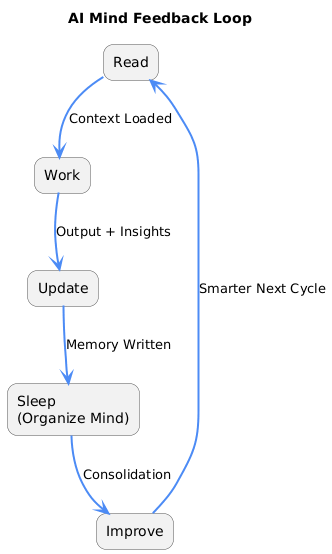
Read → Work → Update → Sleep → Improve
This transforms the AI into a self-improving engineering system — not just an assistant.
Software teams always struggle with:
- architectural decay
- scattered knowledge
- outdated docs
- inconsistent naming
- forgotten decisions
- tribal knowledge
But an AI that sleeps actively fights all of these problems every day.
🧩 But Let Me Be Honest…
Everything I wrote so far works beautifully for an individual developer.
I use .mind personally, and the agent becomes more and more capable over time.
But to be completely honest:
I have not yet tested a shared .mind in a real multi-engineer team.
So I don’t know — not yet — what the team-level impact would be when:
- multiple developers use the same AI mind
- different people trigger memory updates
- architectural opinions need consensus
- documentation evolves across contributors
- conflicts appear in the mind files
In theory, a shared .mind could unify team knowledge in a way no wiki ever could.
In practice, it might need governance, review rules, and version-control discipline.
This is the next stage of experimentation I haven’t run yet —
but I’m excited to explore it.
🛠️ What’s Next?
This idea opens new possibilities:
- Shared team mind — a unified institutional memory
- Nightly AI sleep cycles that reorganize project context
- Mind merging between services or repositories
- Automated architecture validation
- Living domain documentation
- AI that improves the system while the team sleeps
If the first article showed how AI can learn like a junior engineer,
this article explains how it can grow like a senior one.
The next challenge is understanding how multiple developers — human and AI — can work together inside a shared evolving mind.
I’ll write about that soon.
index.md is the entry point, navigation map, and mental compass of the entire .mind/ file system.
It is the file the AI MUST read first before doing anything, because it tells the agent:
- What knowledge exists
- Where it lives
- How the documents relate to each other
- What to load for different types of tasks
Think of index.md as:
🧠 the frontal lobe of the AI mind
🗺️ the table of contents
📚 the librarian of the knowledge system
🏛️ the root of the institutional memory
Without a clear index, the AI cannot reliably locate or connect its own knowledge — which breaks the entire idea of a learnable agent.
---# 📘 **Software Development AI Knowledge Base – Complete Index (Example)****Last Updated:** December 1, 2025**Active Files:** 35 documents (all optimized)**Archive:** 102 documents in `archive/2025/`**Total Documents:** 137**File Size Rule:** All under 50KB (post-optimization)**Optimization State:** Fully reorganized – clean navigation, consolidated patterns**Primary Guide:** **Mind-Driven Development Guide****MCP Integrations:** Active (Git, Jira, Confluence, PostgreSQL)This directory represents a fully-structured **AI Mind File System**, containing business, technical, architectural, and process knowledge used by an AI software development agent.All documents follow the enforced **READ → ACT → UPDATE MEMORY** cycle.---# 🎯 **Quick Start Navigation (Example)****New to the project?**Start with: **Business Overview → Domain Operations → Technical Patterns****Building a new feature?**Follow: **Business Overview → Domain Docs → Architecture Patterns Guide → Technical Patterns****Fixing a bug?**Check: **Archive Index → Related Issue → Technical Patterns → Implementation****Need workflow or process info?**Read: **Mind-Driven Development Guide**---# 🏢 **Business Domain Knowledge (Example – 20 Files)**Purpose: Capture business rules, workflows, stakeholders, processes, and domain knowledge that drives technical implementation.### Core Business Operations* **Business Overview** – Company model, operations, product vision, technical stack* **Core Domain Processes** – Primary workflow, lifecycle stages, business rules* **Document Management** – Storage rules, versioning, hierarchy, permissions* **Financial Operations** – Billing, payments, pricing, reconciliation* **User & Access Management** – Account rules, session behavior, identity model* **Data Management** – Data entities, constraints, privacy & compliance### Specialized Domains* **Authentication Flow*** **Digital Forms & Templates*** **Roles & Permissions*** **Notifications** (email/SMS)* **Analytics & Dashboards*** **Integrations** (3rd-party APIs)* **Reporting Processes*** **Location / Resource Management*** **Assistants / Worker Management*** **Evaluation / Review Processes*** **Quality & Testing (Business Side)*** **Billing Rules** *(ARCHIVED example)*---# 🛠️ **Technical Implementation Knowledge (Example – 12 Files)**Purpose: Architecture decisions, code patterns, implementation standards, and best practices.### Architecture & Patterns* **Technical Patterns** – CQRS, DDD, validation, domain events, repository patterns* **Architecture Patterns Guide** – End-to-end architecture flows* **Architecture Review** – Entire system breakdown* **Storage Providers Guide** – Example S3/Drive/SharePoint abstraction* **Database Design Principles** – Schema conventions, migrations, indexing* **Module Boundaries** – Domain modules, service boundaries### Quality & Testing* **Testing Environments*** **Unit Testing Patterns*** **QA Testing Standards*** **Performance Testing Guidelines**### Infra & Workflow* **Infrastructure** – Deployment, environment configs, monitoring* **Development Workflow** – Git flows, CI/CD pipelines* **Database Migration Process** – Multi-environment guide---# 📋 **Process & Knowledge Management (Example – 8 Files)**### Mind System Management* **Mind-Driven Development Guide** – Primary operational document* **README** – How to use the mind system* **Mind Discovery Prompt** – For discovering new knowledge* **Update Mind Process** – Maintenance & archival rules* **Business Analysis Template** – ROI + value framing* **CHANGELOG** – 6-month rolling history### Archive & Historical Knowledge* **Archive Index** – All archived documents cross-referenced* **Release Notes*** **Project Modules Documentation**---# 🗂️ **Archive Organization (Example)**All historical documents stored under yearly folders:### Current Year (2025)`archive/2025/` contains 89+ documents categorized into:* **Issue Resolutions*** **Mind Analysis & Evaluations*** **Technical Pattern Logs*** **Module Documentation*** **Session Summaries*** **QA & Testing Reports*** **Business Strategy Notes*** **Consolidated Docs**Older years follow the same pattern (`archive/2024/`, etc.)---# 🧭 **Navigation Guide (Example)**### For New Developers**Business Overview → Domain Documentation → Technical Patterns**### For Feature DevelopmentPlanning: **Business Overview → Domain Docs → Architecture Patterns Guide**Implementation: **Technical Patterns → DB Principles → Unit Testing Patterns**### For Infrastructure & Deployment**Development Workflow → Testing Environments → Infrastructure**### For Integrations**Integrations Guide → MCP Docs → Development Workflow**### For QA**QA Testing → Unit Testing Patterns → Testing Environments**---# 📊 **Knowledge Base Metrics (Example)*** **Business Knowledge:** 20 files (50%)* **Technical Knowledge:** 14 files (33%)* **Process Knowledge:** 8 files (20%)* **Archive:** 89+ documents (fully indexed)* **Cross-References:** Bidirectional linking everywhere* **Feedback Loop Compliance:** 100% (READ → ACT → UPDATE MEMORY)* **Maintenance:** Weekly optimization, file size limits respected---# 🔄 **Mind-Driven Development Process – Enforced Feedback Loop**### **Phase 1: READ**Load knowledge, business context, domain rules, and live data (Git/Jira/Confluence).### **Phase 2: ACT**Apply patterns, implement features, validate architecture, write tests.### **Phase 3: UPDATE MEMORY**Document new learnings, update relevant files, archive old content.❗ **This cycle is mandatory, not optional.**Document limits: max 100KB per file, 20–40 active files, no duplication.---
 RoofMan Official Blog
Pingback: A Minimal, Evolving AI Brain for Real Software Development | RoofMan Official Blog
Pingback: How Scripts Enhance AI Consistency and Performance | RoofMan Official Blog