
Avoiding TCP-over-TCP Meltdown in WANs

Introduction
In my home lab, I’ve spent countless hours experimenting with VPN tunneling and multi-WAN aggregation to maximize bandwidth, improve resiliency, and keep traffic secure. On paper, combining OpenVPN with MPTCP (Multipath TCP) should give the best of both worlds: encrypted transport with the ability to harness the sum of multiple internet links.
The reality, however, was very different. When I ran OpenVPN in TCP mode over MPTCP, I ran into the dreaded TCP-over-TCP meltdown. At first, everything seemed fine—throughput scaled nicely, and all WAN links contributed. But after some time, the performance would collapse. VPN sessions would degrade to the speed of a single link, latency would spike, and the benefits of multi-WAN vanished.
This article documents my journey through the problem, why it happens, the dead ends I explored (like UDP-based VPNs), and finally the automation trick that solved the issue.
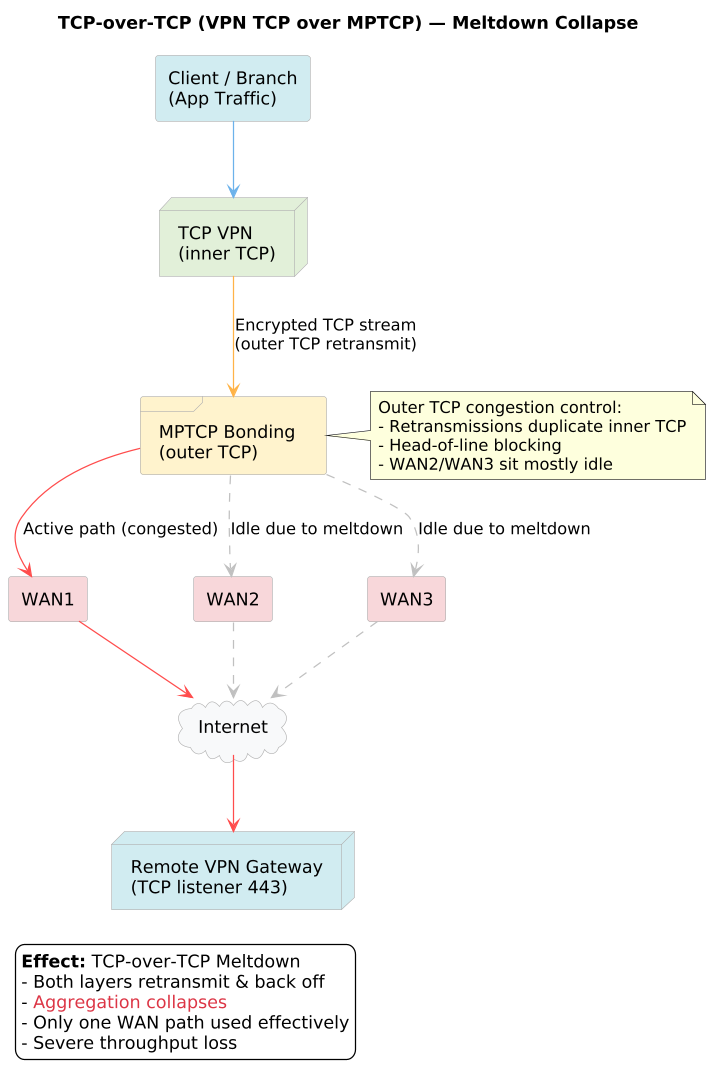
Understanding the TCP-over-TCP Meltdown
TCP was never designed to be nested inside another TCP session. Both layers of TCP introduce their own mechanisms for reliability:
- Inner TCP (OpenVPN) → Manages retransmissions, acknowledgments, and congestion control.
- Outer TCP (MPTCP) → Does the same across multiple paths.
When packet loss occurs, both layers attempt to fix it independently. The result is:
- Duplicate retransmissions
- Aggressive congestion backoff at both layers
- Head-of-line blocking across subflows
This leads to what’s called a meltdown: instead of scaling, throughput collapses, sometimes worse than a single TCP connection over one WAN.
The UDP Detour: Why It Fell Short
Before committing to solving TCP-over-MPTCP, I went down the usual path: avoid TCP-over-TCP at all costs. The standard recommendation is clear—if your inner VPN must be TCP, then run it over a UDP-based outer tunnel to sidestep the meltdown problem.
I experimented with both approaches:
- OpenVPN TCP over UDP using udp2raw, which wraps traffic to look like UDP and slip past throttling or restrictive firewalls.
- OpenVPN UDP over UDP using dedicated WAN bonding tools like GloryTun and MLVPN, which are purpose-built for link aggregation.
On paper, this should have been the clean solution. In practice, it wasn’t. While UDP-based tunneling did prevent the meltdown symptoms, it came at the cost of raw performance. Throughput in my lab consistently plateaued well below what I was able to achieve with TCP-over-MPTCP.
For my specific goal—extracting every last megabit from a mix of DSL, 4G connections—UDP just couldn’t keep up.
The Breakthrough: Refreshing MPTCP Subflows
After more testing, I discovered the real issue wasn’t that TCP-over-MPTCP is inherently broken—it’s that MPTCP subflows go idle over time, especially if traffic is steady but not aggressive. Once subflows collapse, the VPN session gets stuck on a single path, and throughput plummets.
The fix turned out to be simple but clever: periodically “refresh” MPTCP by generating controlled bursts of traffic on outer tunnel.
The Script
Here’s the script I built on OMR Router to do exactly that:
#!/bin/sh
# Tiered OMR speed check with retries per tier.
# Measures baseline TX, runs OMR burst, scales to bps, sums, and compares to tier targets.

# --- Config ---
IFACE="eth0"                         # e.g., mptcp0 / pppoe-wan / eth0
TIERS="75000000 50000000 35000000"   # Tier targets in bps (e.g., 75M, 50M, 35M)
RETRIES_PER_TIER=2                   # Max retries before dropping to next tier
RETRY_SLEEP_SECONDS=5                # Sleep between retries in seconds

BASELINE_SECONDS=1                   # Window to measure baseline TX
OMR_SCALE_NUM=10                     # Calibrates OMR value to bps (8360578 -> ~83e6)
OMR_SCALE_DEN=1                      # Keep as 1 unless you want fractional scaling
LOGFILE="/var/log/omr-speed-check.log"

# --- Helpers ---
mkdir -p "$(dirname "$LOGFILE")" 2>/dev/null

log() {
  printf "%s - %s\n" "$(date '+%Y-%m-%d %H:%M:%S')" "$1" | tee -a "$LOGFILE"
}

# Return TX bps averaged over N seconds (defensive & wrap-aware)
tx_bps() {
  IF="$1"; SEC="$2"
  [ -n "$SEC" ] || SEC=1
  [ "$SEC" -gt 0 ] || SEC=1

  F="/sys/class/net/$IF/statistics/tx_bytes"
  T1=$(cat "$F" 2>/dev/null || echo 0)
  sleep "$SEC"
  T2=$(cat "$F" 2>/dev/null || echo 0)

  case "$T1" in (*[!0-9]*) T1=0 ;; esac
  case "$T2" in (*[!0-9]*) T2=0 ;; esac

  if [ "$T2" -lt "$T1" ]; then
    # Simple 32-bit wrap guard; OK for sub-Gbps with short sampling windows
    DELTA=$(( (4294967295 - T1) + T2 ))
  else
    DELTA=$(( T2 - T1 ))
  fi

  echo $(( (DELTA * 8) / SEC ))
}

run_once() {
  TARGET_BPS="$1"

  # 1) Baseline TX now (without burst)
  BASE_TX_BPS=$(tx_bps "$IFACE" "$BASELINE_SECONDS")
  log "Baseline TX on $IFACE: ${BASE_TX_BPS} bps (window ${BASELINE_SECONDS}s)"

  # 2) Run the burst test and capture its numeric result
  TMP_OUT="/tmp/omr-speed.$$"
  log "Running burst test..."
  /bin/omr-test-speed fasttest >"$TMP_OUT" 2>/dev/null
  RAW=$(tail -n 1 "$TMP_OUT" 2>/dev/null | tr -dc '0-9')
  rm -f "$TMP_OUT"
  [ -n "$RAW" ] || RAW=0

  # 3) Calibrate OMR result to bps
  BURST_BPS=$(( (RAW * OMR_SCALE_NUM) / OMR_SCALE_DEN ))
  log "Burst result (raw): ${RAW} (scaled to ${BURST_BPS} bps)"

  if [ "$BURST_BPS" -eq 0 ]; then
    log "Burst speed is zero. A line may need recharge. Exiting."
    exit 1
  fi

  # 4) Sum baseline + burst
  TOTAL_TX_BPS=$(( BASE_TX_BPS + BURST_BPS ))
  log "Total TX estimate: baseline ${BASE_TX_BPS} + burst ${BURST_BPS} = ${TOTAL_TX_BPS} bps"

  # 5) Check target
  if [ "$TOTAL_TX_BPS" -ge "$TARGET_BPS" ]; then
    log "Target reached: ${TOTAL_TX_BPS} >= ${TARGET_BPS} bps (~ $((TOTAL_TX_BPS/1000000)) Mbps)"
    return 0
  fi

  log "Not enough: ${TOTAL_TX_BPS} < ${TARGET_BPS} bps"
  return 1
}

# --- Main tiered loop ---
TIER_INDEX=1
for TARGET in $TIERS; do
  log "Starting Tier ${TIER_INDEX} target ${TARGET} bps"
  ATTEMPT=1
  while [ "$ATTEMPT" -le "$RETRIES_PER_TIER" ]; do
    log "Attempt ${ATTEMPT}/${RETRIES_PER_TIER} for Tier ${TIER_INDEX}"
    if run_once "$TARGET"; then
      exit 0
    fi
    if [ "$ATTEMPT" -lt "$RETRIES_PER_TIER" ]; then
      log "Retrying in ${RETRY_SLEEP_SECONDS}s..."
      sleep "$RETRY_SLEEP_SECONDS"
    fi
    ATTEMPT=$((ATTEMPT + 1))
  done
  log "Tier ${TIER_INDEX} not met after ${RETRIES_PER_TIER} retries. Lowering target."
  TIER_INDEX=$((TIER_INDEX + 1))
done

log "All tiers exhausted and targets not met."
exit 2
user@OpenMPTCProuter:~# tail -f /var/log/omr-speed-check.log
2025-10-12 13:59:19 - Attempt 1/3 for Tier 3
2025-10-12 13:59:20 - Baseline TX on eth0: 5245688 bps (window 1s)
2025-10-12 13:59:20 - Running burst test...
2025-10-12 13:59:33 - Burst result (raw): 5310645 (scaled to 53106450 bps)
2025-10-12 13:59:33 - Total TX estimate: baseline 5245688 + burst 53106450 = 58352138 bps
2025-10-12 13:59:33 - Target reached: 58352138 >= 35000000 bps (~ 58 Mbps)
2025-10-12 14:00:00 - Starting Tier 1 target 75000000 bps
2025-10-12 14:00:00 - Attempt 1/3 for Tier 1
2025-10-12 14:00:01 - Baseline TX on eth0: 100624 bps (window 1s)
2025-10-12 14:00:01 - Running burst test...
2025-10-12 14:00:15 - Burst result (raw): 4932147 (scaled to 49321470 bps)
2025-10-12 14:00:15 - Total TX estimate: baseline 100624 + burst 49321470 = 49422094 bps
2025-10-12 14:00:15 - Not enough: 49422094 < 75000000 bps
2025-10-12 14:00:15 - Retrying in 5s...
2025-10-12 14:00:20 - Attempt 2/3 for Tier 1
2025-10-12 14:00:21 - Baseline TX on eth0: 614200 bps (window 1s)
2025-10-12 14:00:21 - Running burst test...
2025-10-12 14:00:34 - Burst result (raw): 5469747 (scaled to 54697470 bps)
2025-10-12 14:00:34 - Total TX estimate: baseline 614200 + burst 54697470 = 55311670 bps
2025-10-12 14:00:34 - Not enough: 55311670 < 75000000 bps
2025-10-12 14:00:34 - Retrying in 5s...
2025-10-12 14:00:39 - Attempt 3/3 for Tier 1
2025-10-12 14:00:40 - Baseline TX on eth0: 140936 bps (window 1s)
2025-10-12 14:00:40 - Running burst test...
2025-10-12 14:00:59 - Burst result (raw): 5417386 (scaled to 54173860 bps)
2025-10-12 14:00:59 - Total TX estimate: baseline 140936 + burst 54173860 = 54314796 bps
2025-10-12 14:00:59 - Not enough: 54314796 < 75000000 bps
2025-10-12 14:00:59 - Tier 1 not met after 3 retries. Lowering target.
2025-10-12 14:00:59 - Starting Tier 2 target 50000000 bps
2025-10-12 14:00:59 - Attempt 1/3 for Tier 2
2025-10-12 14:01:00 - Baseline TX on eth0: 84448 bps (window 1s)
2025-10-12 14:01:00 - Running burst test...
2025-10-12 14:01:13 - Burst result (raw): 5585445 (scaled to 55854450 bps)
2025-10-12 14:01:13 - Total TX estimate: baseline 84448 + burst 55854450 = 55938898 bps
2025-10-12 14:01:13 - Target reached: 55938898 >= 50000000 bps (~ 55 Mbps)
How It Works
- Runs /bin/omr-test-speed fasttest to generate a 10-second traffic burst.
- Checks if throughput meets a target (7.5 MB/s or higher in my case).
- Retries every 5 seconds until the target is reached.
- Logs all activity to /var/log/omr-speed-check.log.
I scheduled this script to run via cron every 45 minutes, meaning MPTCP gets a quick “kick” to ensure all subflows are alive and balanced.
Results in the Lab
The results were night and day. With this script in place:
- No more collapse → VPN sessions remained stable for hours without throughput degrading.
- Full aggregation speed → My DSL, 4G lines all contributed consistently, giving me near the sum of their capacity.
- Resiliency restored → If one link suffered packet loss, MPTCP redistributed flows smoothly instead of freezing.
- Logs for visibility → The log file let me monitor when refreshes occurred and confirm that subflows were active.
In other words, automation turned a frustrating setup into a reliable, high-performance multi-WAN VPN.
Why This Beats UDP in My Case
While UDP tunnels avoid the meltdown by design, they also lack the sophisticated congestion handling and path management that MPTCP provides. With proper refreshes, TCP-over-MPTCP not only avoids collapse but actually delivers higher sustained throughput than UDP bonding solutions in my environment.
For me, the conclusion is clear:
MPTCP wins with the right automation and tweaks.
UDP sucks (at least for my aggregation requirements).
Recommendations
- If you’re running OpenVPN TCP over MPTCP and notice throughput collapsing after some time, you’re likely hitting the same issue.
- Before abandoning TCP for UDP, try automating periodic subflow refreshes with a lightweight script.
- Adjust the refresh interval to your needs (30 min, 45 min, or 1 hour).
- Always measure with real workloads—not just speed tests—to validate improvements.
References & Further Reading
- Multipath TCP (IETF Draft)
- MLVPN Official Documentation
- GloryTun WAN Bonding
- RFC 8790 – Multipath TCP architecture and challenges

 RoofMan Official Blog